

Birthday Automations are automations that send a message each year based on a participant’s stored date of birth.
Automatically send a personalized birthday email or SMS to participants each year.
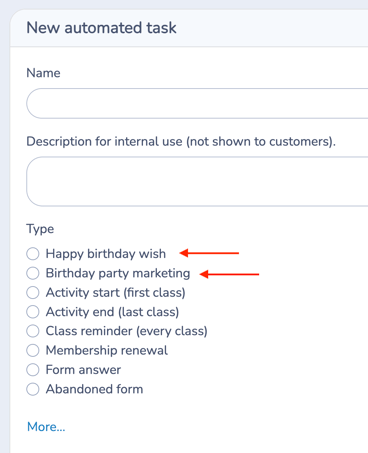 Use this automation to celebrate birthdays, promote birthday party services, or combine both — without manual follow-up.
There are two birthday automation types:
-
Happy Birthday Wish
-
Birthday Party Marketing
Both use the same trigger logic.
The difference is the default message template loaded when configuring the message.
📌 At a Glance
Definition
Birthday Automations send an email or SMS each year based on a participant’s stored date of birth.
Use it when
• Sending annual birthday greetings
• Promoting birthday party services
• Offering birthday discounts
• Running birthday-based marketing campaigns
Inputs
• Participant date of birth
• Automation timing configuration
• Selected audience (lists or forms)
Outputs
One message per participant per year.
Key rule
A participant must have a valid date of birth stored in their record for the automation to trigger.
Covered in this guide
Use this section to quickly find the Birthday Automation setting or workflow you need.
1. When to use Birthday Automations
-
Send a birthday greeting to participants
-
Strengthen client relationships
-
Promote birthday party services
-
Drive additional bookings
-
Stay top-of-mind with families
2. 🧭 How This Automation Works
This automation is triggered by the participant’s date of birth.
Each automation sends one message per year, on or around the participant’s birthday.
You can configure the message to send:
-
On the birthday
-
A number of days before
-
A number of days after
Think of it as a recurring annual rule tied to each participant’s birth date.
3. Step-by-Step Guide
Step 1: Create the Automation
-
Go to Communications > Automation > + Create
-
Enter a clear Name
-
(Optional) Add an internal description
-
Select either:
-
Happy Birthday Wish, or
-
Birthday Party Marketing
-
-
Toggle Send automatically: Yes
Step 2: Set Timing
Define how many days before or after the birthday the message should send.
-
Use 0 to send on the birthday itself
Examples:
-
Send on the birthday
-
Send 7 days before
-
Send 3 days after
Timing is calculated individually for each participant based on their stored date of birth.
Step 3: Define Your Recipients
Choose where recipients come from:
Option A: Lists (Recommended)
Use a dynamic list that includes participants with a valid date of birth.
You can use:
-
A Class/Event participant list to combine participants from multiple classes
-
A Master List to combine multiple lists into one audience
Best when:
-
You want one automation to apply to all active participants
-
You segment participants by program type or category
-
You want reusable, centralized birthday logic
Option B: Forms
Use this when birthday messages should apply only to participants registered through a specific form.
Best when:
-
A program has its own dedicated registration workflow
-
You want to isolate birthday communication to a specific intake group
Only participants with a valid date of birth stored in their record will qualify for this automation.
Step 4: Configure advanced options
Depending on your configuration, you may use:
At an exact age
Limit the automation to participants who are turning a specific age. You can define the exact age in:
-
Years
-
Months
Only participants reaching that exact age on their birthday will receive the message.
Use this for:
-
Milestone birthdays (e.g., turning 5, 10, 13, 18)
-
Age-based program transitions
-
Promotional offers tied to a specific age
-
Eligibility-based messaging
Step 5: Configure Your Message
Click Configure the message
Choose one:
-
Write a new message
-
Select a Template
-
Select a Quick Message
You may include:
-
Birthday wishes
-
Promotional offers
-
Discount codes
-
Booking links
You can personalize using placeholders such as:
-
First name
-
Child/children first name(s)
-
Date of birth
Step 6: Save and check the Simulation
Click Save to activate the automation.
Once saved and set to Send automatically: Yes, Activity Messenger evaluates birthday dates daily and schedules messages when timing conditions are met.
After saving, use the Automation Simulation panel to confirm which participants would qualify on a specific date.
The Simulation does not send messages. It only previews which messages would be scheduled based on your current settings.
Automation Simulation
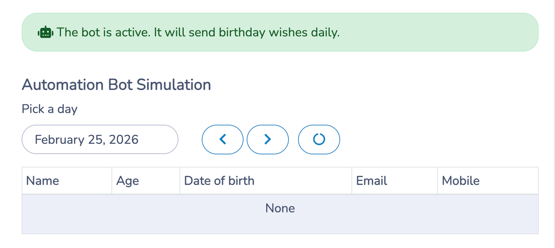
After activation, the Automation Simulation panel appears at the bottom of the configuration page.
Use it to:
-
Select a specific date
-
Preview which participants will receive a message on that day
-
Confirm age filters (if using “At an exact age”)
-
Validate that timing is configured correctly
The Simulation does not send messages.
It simply previews which messages would be scheduled based on your current settings.
💡 Best practice: Check the Simulation for an upcoming date to verify the automation is configured correctly.
4. Happy Birthday Wish vs Birthday Party Marketing
Both automation types:
-
Use the participant’s date of birth
-
Send one annual message
-
Follow the same timing logic
-
Support placeholders and personalization
The difference is the default template loaded when configuring the message.
Happy Birthday Wish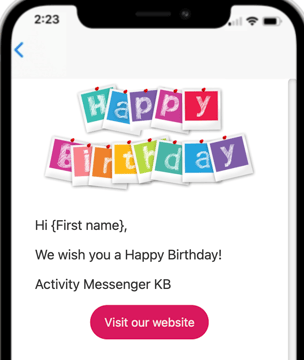
Loads a simple celebratory greeting template.
Example:
-
Personalized birthday greeting
-
Friendly message
-
Website button
Best for relationship-building.
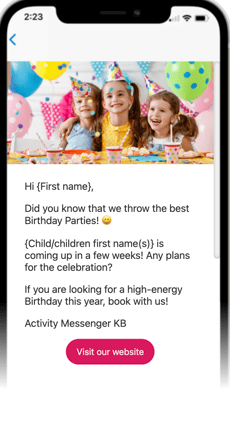
Birthday Party Marketing
Loads a promotional birthday party template.
Example:
-
-
-
-
-
-
Mentions upcoming birthday
-
Promotes birthday party services
-
Includes booking call-to-action
-
-
-
-
-
Best for revenue-driving campaigns.
You can fully modify either template or create your own message.
5. 🧩 Key Configuration Notes
-
Requires a valid date of birth stored in participant data.
-
Sends once per year per participant.
-
Timing is calculated individually.
-
Works with placeholders for personalization.
-
The system checks birthdays daily.
- If no valid date of birth exists in the participant record, the automation will not trigger.
6. Common Workflows
Below are typical operational uses for Birthday automations.
Why use Birthday Automations
- Strengthens long-term client relationships
- Increases engagement
- Generates additional party bookings
- Automates annual outreach
1️⃣ Simple Birthday Greeting
Goal: Strengthen client relationships.
Configuration:
-
Happy Birthday Wish
-
Send on birthday
Outcome:
Participants receive a warm, automated greeting.
2️⃣ Birthday Party Promotion
Goal: Drive party bookings.
Configuration:
-
Birthday Party Marketing
-
Send 14 days before birthday
-
Include booking link
Outcome:
Parents receive timely promotional reminder.
3️⃣ Birthday Party Automation Workflow
Goal: Automate party invitations and RSVP
This is a powerful and complex workflow that combines automations, templates, certificates and birthday party bookings.
For the full workflow, see Automate Birthday Party Reservations and RSVPs.
4️⃣ Combined Strategy
Goal: Relationship + revenue.
Configuration:
-
Automation 1 → Send marketing message 14 days before
-
Automation 2 → Send birthday wish on birthday
Outcome:
Promotion first, celebration second.
7. 🧭 Workflow Design Tip
Use Birthday automations when timing is driven by a participant’s date of birth.
If communication depends on:
-
A class schedule → Use Class Reminder
-
First session → Use Activity Start
-
Form submission → Use Form Response
-
Membership expiration → Use Membership Renewal
Think in terms of what initiates the workflow:
Date of birth → Birthday Automation
Form submission → Action-based automation
Related guides
-
Communications 105: Automating Email and SMS Messages
-
Communications 103: Creating and Sending Messages
-
Communications 104: Message Assets
-
Communications 102: Building and Managing Lists
-
Quick Messages: Creating and Using Text-First Operational Messages
-
Templates: Creating and Using Reusable Email Layouts
-
Personal Information and Electronic Message Laws in Canada and the USA